UltraISO is a free utility tool that helps you manage CD and DVD images on your computer. It’s mainly used for creating and editing ISO files, which are digital copies of physical discs. Use this to keep your data organized or to make bootable backups for your favorite systems.
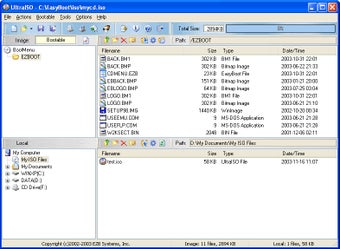
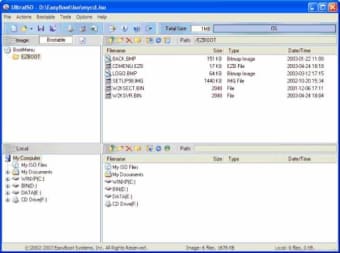
UltraISO features a double window design that makes moving files feel very natural. You can simply drag and drop items to build your own images quickly. It supports almost every disc format available today, making it a versatile choice. Its straightforward interface enables even first-time users to handle complex tasks easily.
On the downside, the aesthetics of the software feel quite outdated compared to newer apps. Some people might find the buttons look a bit old, like they belong on an older computer system. While it gets the job done, it doesn’t have the modern shine that some users expect nowadays.
Reliable and user-friendly
UltraISO is a reliable option for anyone needing to work with disc images. It offers a solid set of features that cover all the basics and more. Even though it looks a bit aged, its performance is consistent. It is a handy program to have for any digital file collection today.
Dinkar Kamat
Dinkar has more than 10 years of experience in content creation, including technical articles, travel writing, and product strategy. His expertise spans SEO, digital marketing, and structured editorial work. He focuses on producing content that is both accurate and accessible for diverse audiences.
UltraISO is a ISO CD/DVD image file creating / editing / converting tool, it can directly edit the CD/DVD image file and extract files and folders from it, as well as directly make ISO files from your CD/DVD-ROM or hard disk. At the same time, you can maintain the ISO bootable information, thus creating your own bootable CD/DVDs. You now have the power to make and edit your own ISO files, and then burn them to CD/DVD for your own needs.
UltraISO is in sole possession of the intellectualized ISO document format analyzer, it can process at the present time almost all types of image files, including ISO and BIN, it may even support new image files which are yet to be created.
UltraISO can open these image files, directly extract files and folders, edit it and convert other image files to the standard ISO format. UltraISO uses the double window unification user contact interface, you have the choice to only use the quick buttons and/or the mouse Drag & Drops, you can handle any CD/DVD image file easily.
Laws concerning the use of this software vary from country to country. We do not encourage or condone the use of this program if it is in violation of these laws. Softonic may receive a referral fee if you click or buy any of the products featured here.